GST & TDS reconciliation software for CAs & accountants in India
Match every paisa.
PaisaMatch Plus turns the exports you already take from BUSY, Tally or Excel into GST returns, reconciliations, a clause-wise Form 3CD extract and the ITR computation — with the working shown for every single figure.
30-day free trial · every feature · no card, no sign-up · then ₹2,499 a year if you buy by 31 March 2027, or ₹399 a month
On your phone? PaisaMatch Plus is a Windows app — open paisamatchplus.in on your office PC to install it.
- Runs on your own PC
- No data upload
- Works with BUSY, Tally & Excel
| Supplier | Books | Status |
|---|---|---|
| Alpha Pipes Ltd | 1,18,000.00 | Matched |
| Beta Polymers | 64,900.00 | Amount differs |
| Gamma Fittings | 22,420.00 | Not in 2B |
| Delta Traders | 9,440.00 | Matched |
Illustration with sample data
Year-end is a matching problem.
The tax is rarely the hard part. Finding the handful of entries that do not agree — across hundreds of invoices and a dozen reports — is where the days go.
Books vs the portal
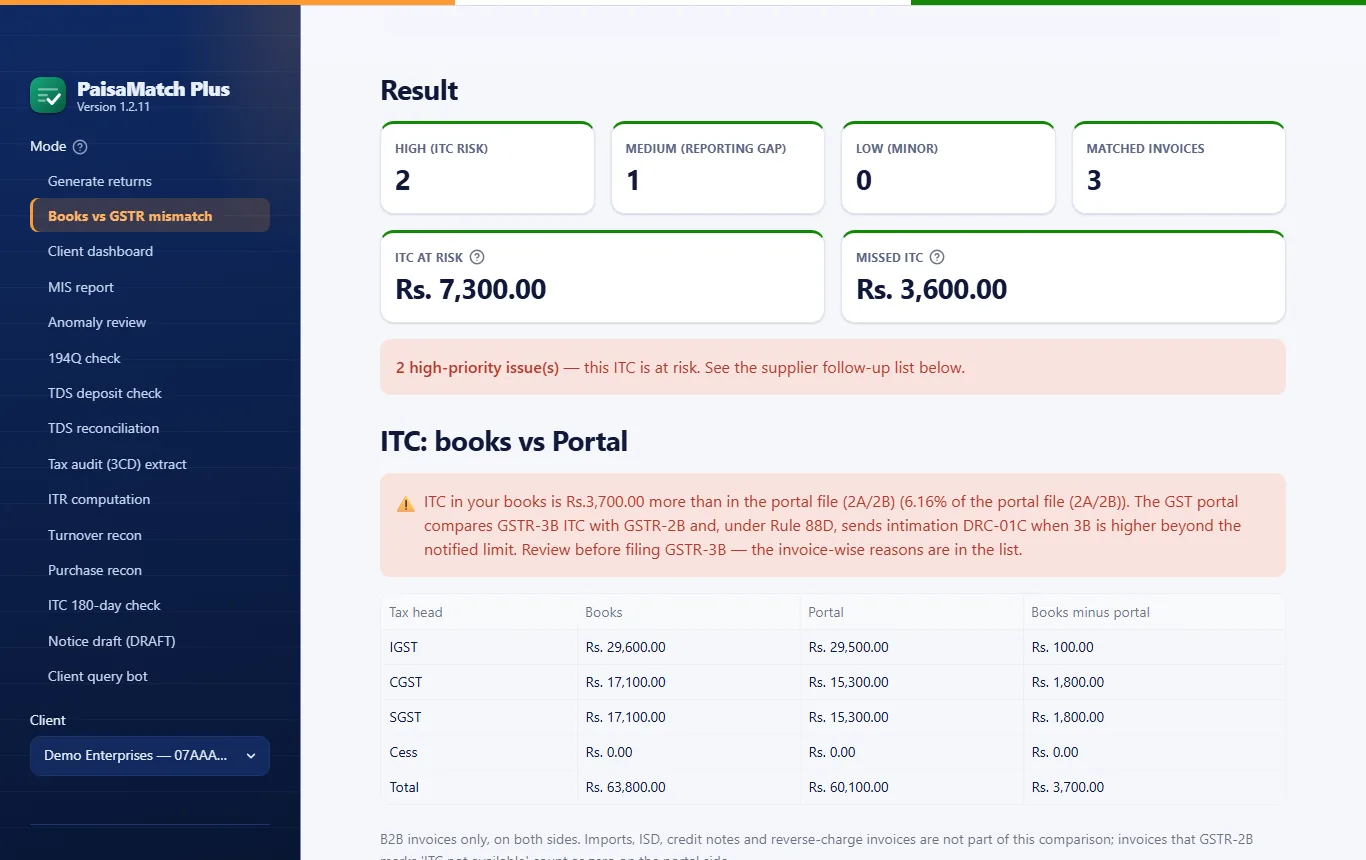
GSTR‑2B says one thing, the purchase register another. PaisaMatch Plus lines them up invoice by invoice and shows the ITC at risk on each difference.
26AS vs your ledger
Deductor names never match — proprietors appear under the owner’s name and reversals hide in the rows. The matching still gets to the rupee, and says how it matched.
Clause after clause
Form 3CD pulls from ten different reports. Every clause shows its status, and a clause without data says exactly which file it needs — nothing is skipped quietly.
Why not just an Excel sheet?
A spreadsheet can match invoice numbers. These are the cases that decide whether the ITC figure is right — and what PaisaMatch Plus does with each.
| When | What PaisaMatch Plus does |
|---|---|
| The bill number is written differently — T‑2803 in the books, 2803 on the portal | Paired when the GSTIN, taxable value and tax agree and the dates are within three days. Any other difference in the number is shown as a flagged pair for you to check. |
| The total tax agrees but the heads don’t — CGST and SGST in the books, IGST on the portal | Flagged as high risk, with the ITC at risk worked out head by head. |
| The same bill is entered twice in the books | Flagged when the portal shows it only once, with the extra ITC counted as at risk. |
| An invoice is missing from GSTR‑2B | Listed supplier by supplier with a ready message for each supplier, and a reminder to check IMS — invoices kept pending or rejected there also drop out of 2B. |
| Your client uses BUSY, Tally or some other software | BUSY and Tally exports are read as they are. For other software with separate CGST, SGST and IGST columns, you tell the app once which column is which. |
| A month’s work for twenty clients | One folder per client, one run for all of them, and one summary workbook for the month. |
| The rules change | Rates, limits and section numbers are kept by financial year, and updates come through the Microsoft Store. |
GST and income tax, in one desktop app.
Built around the reports an Indian practice actually files — with rates, limits and section numbers kept by financial year, the Income-tax Act 2025 and GST 2.0 included. Where a new form or section number is not confirmed yet, the output says so.
GST
- GSTR‑1 and GSTR‑3B portal JSON in the official schema
- Books vs GSTR‑2A/2B: mismatched, missing and duplicate invoices
- ITC in the books vs GSTR‑2B, IGST, CGST and SGST apart — checked before GSTR‑3B
- GSTR‑2A next to 2B: invoices a supplier filed after the 2B are kept apart
- A ready follow-up message for each supplier whose invoices are missing
- 180-day ITC reversal check from BUSY Bills Payable
- Turnover and purchase reconciliation with a month-by-month coverage check
- HSN summary, documents issued and QRMP PMT‑06 reminders
Income tax
- TDS reconciliation against Form 26AS, deductor by deductor
- Section 194Q tracker and late TDS deposit interest — both bases
- Clause-wise Form 3CD data extract, depreciation chart included
- ITR computation from net profit to tax payable or refund
Practice
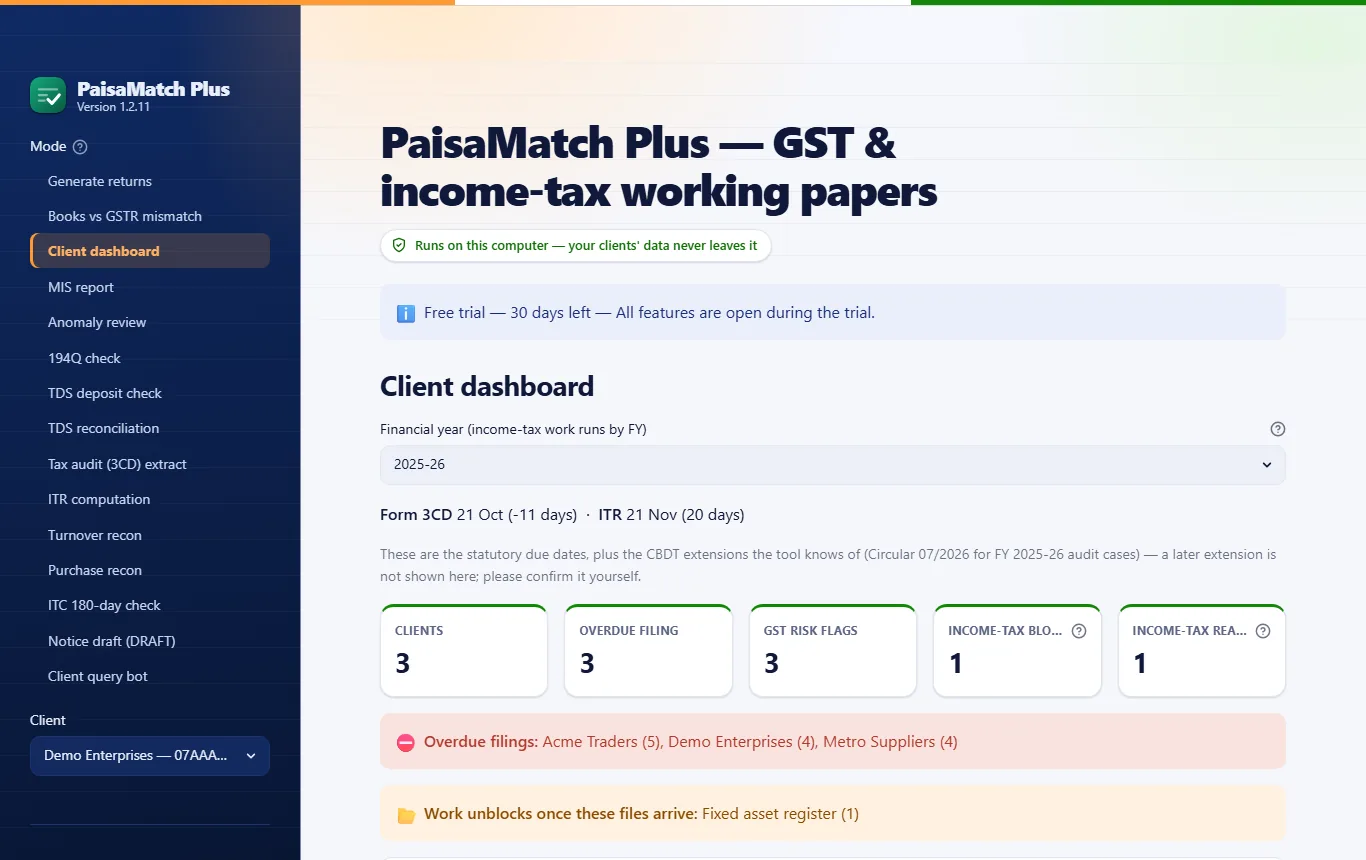
- Multi-client dashboard: filed, due, and waiting for data
- Notice tracker: every client’s reply-by dates in one place
- A ready message asking each client for the files you are waiting on
- Books vs GSTR‑2B for every client in one run, from one folder
- MIS, receivables and payables ageing, anomaly review
- DRAFT notice replies (facts only) and fixed client-query answers
From export to working paper in three steps.
No new data entry. No change to how your team keeps books.
-
Export
Take the register, ledger, trial balance or 26AS text file from BUSY, Tally, Excel or TRACES — the reports you already use.
-
Upload
Drop the files into PaisaMatch Plus on your computer. It detects the format and checks every row before anything is built.
-
Review & download
Read the errors and warnings first, then download portal JSON and Excel working papers ready for your review.
The real app, not a mock-up.
PaisaMatch Plus on Windows, run on the sample data that comes with it. Download the complete sample reports — PDF and Excel, exactly as the app saves them.
Your clients’ books never leave your computer.
PaisaMatch Plus runs locally. There is no cloud account, no upload step and no analytics. The only thing that goes online is a small licence check — and no invoice, ledger or tax figure is ever in it. Read the privacy policy
-
Processed on your machineRegisters, ledgers, 26AS and every report stay in a folder on your PC.
-
Works offlineNo internet? The app keeps working. Being offline is normal, not an error.
-
No trackingNo analytics, no advertising, and nothing is ever sold or shared.
What it deliberately does not do.
Every output is a working paper for professional review — so the tool is designed to show its work, not to hide it.
It does not file anything
There is no connection to any portal. The tool prepares the files and you upload them yourself.
It does not make your judgment calls
A penalty add-back, MSME status, the tax regime — the tool flags them with the working, and leaves the decision to you.
It does not guess
If something is not in the books, the line says so — along with the file it needs. It is never filled in quietly.
Built by an accountant, not a software company.
PaisaMatch Plus is made by Chetan Kukreja, an accountant in India, around the reports a practice files every month — the purchase register, GSTR-2B, Form 26AS and the trial balance. Before every release, more than 1,500 automated tests check the rules, many of them on anonymised real exports from BUSY and Tally.
How the numbers are checked →Free calculators, right in your browser.
Same maths as the desktop app, tested by the same suite. No sign-up, and nothing you type is sent anywhere.
Late TDS interest
From the due date and from the date of deduction, side by side.
Open →194Q / 393(1)
TDS on purchases, with the right section for each financial year.
Open →GST due dates
QRMP’s 22nd-or-24th worked out from the GSTIN.
Open →GST calculator
Inclusive or exclusive, CGST+SGST or IGST.
Open →Old vs new regime
Both regimes side by side, with 87A and marginal relief.
Open →234A / 234B / 234C
Interest for a late return and short advance tax.
Open →ITC reversal (180 days)
Supplier unpaid for 180 days — the ITC to reverse, head by head.
Open →Tax audit applicability
Section 44AB — turnover and the cash condition.
Open →How the reconciliations work.
Plain-English guides to the two matches that take the most time — what to match on, why entries differ, and what to do about each difference.
GSTR-2B vs purchase register
What to match on, why invoices go missing, IMS and Rule 36(4), and what to do with each difference.
Read the guide →Form 26AS vs the books
Why TDS credit and the ledger differ, how to match deductor names, and what Form 168 changes.
Read the guide →GSTR-2B reconciliation in the app
Invoice by invoice, with the ITC at risk, supplier messages and a PDF for the client.
See how it works →Questions CAs ask
What is PaisaMatch Plus?
Windows desktop software for chartered accountants, tax practitioners and accounts teams in India. It reads the exports you already take from BUSY, Tally or Excel and builds GSTR-1 and GSTR-3B portal JSON, a books vs GSTR-2A/2B reconciliation, a Form 26AS TDS reconciliation, a clause-wise Form 3CD data extract and an ITR computation working paper.
Is client data uploaded anywhere?
No. Everything runs on your own computer. The only thing that goes online is a small licence check, and no invoice, ledger or tax figure is ever in it.
Does it file returns on the GST or income-tax portal?
No. It prepares the JSON and the Excel working papers; you review them and upload them yourself. It has no connection to any government portal.
Which accounting software does it work with?
BUSY, Tally and plain Excel exports — and the register from any other software that exports to Excel or CSV with separate CGST, SGST and IGST columns: you tell the app once which column is which, and it remembers the layout for every client. For GST it also reads the GSTR-2A/2B download (Excel or JSON); for TDS, the Form 26AS text file from TRACES.
Does it help before a DRC-01C intimation?
Yes. Every GSTR-2B check also compares the ITC in your books with GSTR-2B — IGST, CGST, SGST and cess separately — and shows the difference and the percentage, so you can review it before filing GSTR-3B. Under Rule 88D the portal sends DRC-01C when GSTR-3B claims more than GSTR-2B beyond a notified limit. The app does not claim any safe limit; the call stays with you.
Can it keep track of notices for all my clients?
Yes. Add each notice with the reply-by date written on it, and the client dashboard keeps overdue and due-soon replies at the top. It does not fetch anything from any portal. For GST notices it can also prepare a facts-only DRAFT reply for you to complete.
Is there a free trial?
Yes — 30 days with every feature, no card and no sign-up. After the trial, a licence plan is needed; the rates and contact details are below.
How much does a licence cost?
₹399 for a month, ₹999 for three months, ₹1,749 for six months or ₹2,999 for a year. Launch offer: the annual licence is ₹2,499 if you buy by 31 March 2027, and your renewals stay at ₹2,499. One licence covers one computer and any number of clients, with every feature included. No GST is added to these prices.
How do I buy a licence?
Send a message on WhatsApp or by email with the plan you want — the buttons are in the pricing section below. You pay by UPI, and your licence key comes in the same chat the same day. In the app, open License in the left sidebar, paste the key and press Activate license.
Can I get a refund?
No — licences are not refundable. That is why the first 30 days are free with every feature: try it on your own clients’ files before you buy.
What if I change my computer?
The licence moves with you. Send us a message when you switch, and we move the same key to the new computer; your paid period carries on as before. A licence works on one computer at a time.
What happens when the trial or a licence ends?
Nothing is deleted. Your clients, settings and earlier reports stay on your computer and stay open; only new reports pause until you add a licence key.
Is there a referral offer?
Yes. When a CA or accountant you refer buys their first licence, every three months they buy earn you one free month, added to your next licence. So three referrals on annual plans earn a full year free, and on monthly plans one month. Leftover months carry forward. Only a paid licence for a different firm counts — ask them to mention your name or WhatsApp number when they buy.
Which versions of Windows does it run on?
Windows 10 (version 1809 or newer) and Windows 11, installed from the Microsoft Store.
Try everything first. Pay only if it saves you time.
Every feature unlocked from day one — no card, no sign-up. After the trial, choose a licence plan. One licence covers one computer and any number of clients, and no GST is added to these prices:
- Annual ₹2,999 for 12 months (₹250 a month) about ₹8 a day
- Half-yearly ₹1,749 for 6 months (₹292 a month)
- Quarterly ₹999 for 3 months (₹333 a month)
- Monthly ₹399 for 1 month
Launch offerAnnual licence at ₹2,499 when bought by 31 March 2027 — under ₹7 a day — and your renewals stay at ₹2,499.
Refer & earnFor every three months of licence bought by the CAs and accountants you refer, you get one month free — three annual referrals, a full year.
To buy a licence key (pay by UPI, key the same day): WhatsApp: +91-9211429177 | Email: chetan@paisamatchplus.in
Download for Windows
- Microsoft Store live — get PaisaMatch Plus for Windows. Works on Windows 10 (1809 or newer) and Windows 11. It installs and updates through the Microsoft Store, like any other Store app.
On your phone? Open this page on your office PC to install the app.